

The Ocean™ 2023 new release includes enhancements that have been carefully designed to improve the user experience and introduces a number of operational tools that provide a higher level of precision in project development and predictive image production.
Users can now replicate diffraction patterns to identify interference and image quality degradation. OceanTM has also enriched its human vision module to provide finer optical simulation analysis, by reproducing how the human visual experience changes, depending on lighting conditions and the age of the observer. The user interface has been improved and simplified to augment productivity and simulation smoothness. Finally, one of the most eagerly awaited features in this release is the increased versatility it offers Python users, marking a significant milestone in strengthening user interaction with the platform.
New features :
- Pixel Diffraction
- Human vision
- User Interface
- Python 3 bindings

Pixel Diffraction
Ocean™ 2023 now features an advanced tool that accurately simulates diffraction patterns. It enables users to delve into diffraction phenomena, to study materials characterisation with the utmost precision.
Diffraction patterns on a mobile phone screen occur when light hits the edges of individual pixels on the screen. As the light passes through or around these pixel edges, it is diffracted, causing the light to scatter and create interference patterns. These patterns can appear as coloured or shimmering effects, which are often seen when looking at fine details or small text on the screen. This phenomenon is due to the wave nature of light and the finite size of pixels. It can affect image quality, especially on high-resolution displays, and can be disruptive or distracting to the human visual experience.
Within Ocean™ we’ve introduced a state-of-the-art tool that accurately simulates the diffraction patterns observed on mobile phone screens. This tool enables users to customise patterns by specifying their intensity in different regions, making it ideal for optical simulation analysis. What sets this tool apart is its ability to perform spectral diffraction even without full spectral data.
This addition leverages Ocean’s technical capabilities, and allows users to explore diffraction phenomena, generate predictive images and study material interactions with precision.
Human Vision
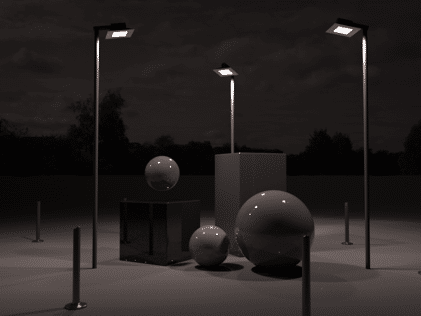
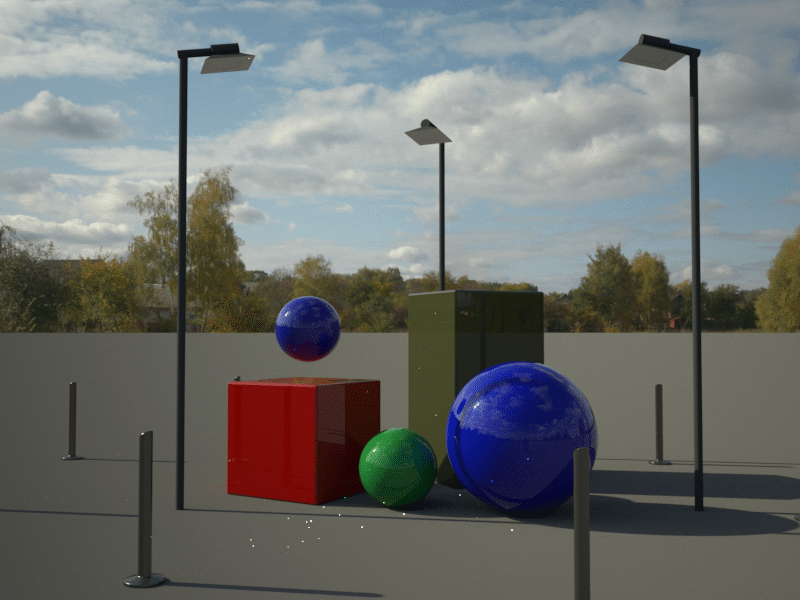
The human vision module of our ray tracing software has been enhanced to include additional features. It effectively replicates several aspects of the human eye, that profoundly affect how we perceive a scene, and enables optical simulation analysis of a particular environment. These include adapting to different lighting conditions, altering with the age of the observer, and adjusting to sudden changes in light intensity:
Human Vision – Light condition
The human eye adapts to various lighting conditions by using different types of vision: photopic, scotopic, and mesopic.
- Photopic Vision: Occurs in bright light and uses cone cells for colour and fine detail perception, providing colour vision and high acuity.
- Mesopic Vision: Found in medium light conditions, such as dawn or dusk, with a blend of both rod and cone cells, providing some colour perception and increased sensitivity to light.
- Scotopic Vision: Takes place in very low light or at night, relies on rod cells without colour perception, and primarily detects motion and shape.
After the user selects the desired light mode, the tool provides a predictive image of the human visual experience in post-processing. It also displays the customized feedback on the render, showing how the selected light mode affects both colour and intensity.


Human Vision – Observer’s age
This feature Ocean™ 2023 allows users to replicate the effect of age on the perception of a scene, accurately simulating the human visual experience. As individuals age, their visual perception undergoes changes that can affect how they perceive the intensity of images.
- Younger Age: Younger individuals tend to perceive image intensity more vividly and with greater contrast. Their eyes can detect subtle differences between light and dark areas more effectively.
- Older Age: Older individuals may experience a reduction in the perception of image intensity. Changes in the eye’s lens and retina can lead to decreased contrast sensitivity, making it harder to discern fine variations in brightness.
The choice of age is a user parameter. It is taken into account in the various functions, such as glare or lighting conditions, to generate predictive images with the highest precision.
User interface
OceanTM 2023 has streamlined the process of moving between scene configuration and simulation launch with the new Results Toolbox. No more cluttered horizontal tabs piling up, now your models are neatly organised and accessible through this new widget. Within the list, they can all be found instantly, thanks to the inclusion of simulation previews for fast identification.
When it comes to editing objects, you’ll also find the Object Toolbox equipped with new features such as the convenient “Apply All” and “Revert All” buttons, enhancing your editing experience.
On the Projet Manager Toolbox side, it is now simpler to keep track of the status of your simulation – whether it is queued, processing, or failed – you can stay on top of your projects more easily.

Python 3 bindings
We are proud to announce our new “Python 3 bindings” Ocean™ feature! Python is a widely used scripting language, well suited for scientific applications, including optical simulation analysis.
It provides many packages that could help to extend the functionality and versatility of our software. The new Ocean™ 2023 Python tool , available as a wheel package, allows fine control over all Ocean™ features: creating a complete scene from scratch, loading and modifying a scene, performing computations locally and/or remotely, accessing and processing results.
By accessing the low-level API, Python 3 bindings allow you to go even further:
- CAD importer: Convert a CAD file (glb, obj, stl, …) into an Ocean™ geometry.
- 3D visualization: Display an Ocean™ CAD.
- Custom GUI: Create a Graphical User Interface, designed and based on your needs.
- Optimization: Find material parameters to fit a target image.
Some of these examples have been developed and are used as tutorials in the documentation of the Ocean™ python package.
See a short example to create a scene in Ocean™:
					from ocean import abyss, utils
##
# CREATE A SCENE
##
scene = abyss.nodes.Scene("simple_scene")
sphere = abyss.nodes.geometries.Sphere("sphere", 4.0)
#Add sphere geometry to the scene
scene.add(sphere)
#Create an Instance using sphere geometry
sphereInstance = abyss.nodes.Instance()
sphereInstance.setGeometryName("sphere")

linkedMat = abyss.nodes.material.Linked("linked")
#Create a simple lambertian material
sphere_mat = abyss.nodes.material.Generic("sphere_mat")
bsdf = abyss.nodes.bsdf.Lambertian("bsdf")
diffuse = abyss.nodes.filtershader.Uniform("shader")
spectrum = abyss.nodes.spectrum.Rgb("spec")
diffuse.setSpectrum(spectrum)
bsdf.setDiffuse(diffuse)
sphere_mat.setBsdf(bsdf)

# Create instances
# Add multiple sphere
for i in range(-20,21,10):
    # Create a transformation matrix for each sphere instance
    # Translate on Y axis and apply random scales
    transmat = utils.matrix.compose(
        position = np.array([0,i,0]),
        scale = np.array(
            [randrange(70,130)/100,
            randrange(70,130)/100,
            randrange(20,200)/100])
    )
    sphereInstance.setTransform(transmat)
    # Apply a material to each instance
    mat_name = "sphere_mat_"+str(i)
    lMat = linkedMat.copy()
    lMat.setTarget(mat_name)
    # Link the instance with the linked material
    sphereInstance.setMaterial(lMat, False)
    # Copy the material and apply a random color
    mat = sphere_mat.copy()
    mat.getBsdf().getDiffuse().getSpectrum().setRgb(np.random.rand(3))
    mat.setName(mat_name)

    scene.add(mat)
    scene.add(sphereInstance)


Responses