Introduction
OceanTM 2020 offers the ability to compute only once on areas of the render that never change and, thus, to greatly improve the overall time spent on a project. This method is called mask rendering and we will learn about the concept of this technique as well as show concrete .
Concept of mask rendering and image composition
Mask Rendering

Figure 1 – Representation of mask rendering; (left) normal render of the scene, (middle) binary mask, (right) combination of both
Image composition

Figure 2 – Representation of image composition; (left) environment render image computed once, (middle) render image of the OOI computed for each setting, (right) combination of both
A tool to optimize your render project
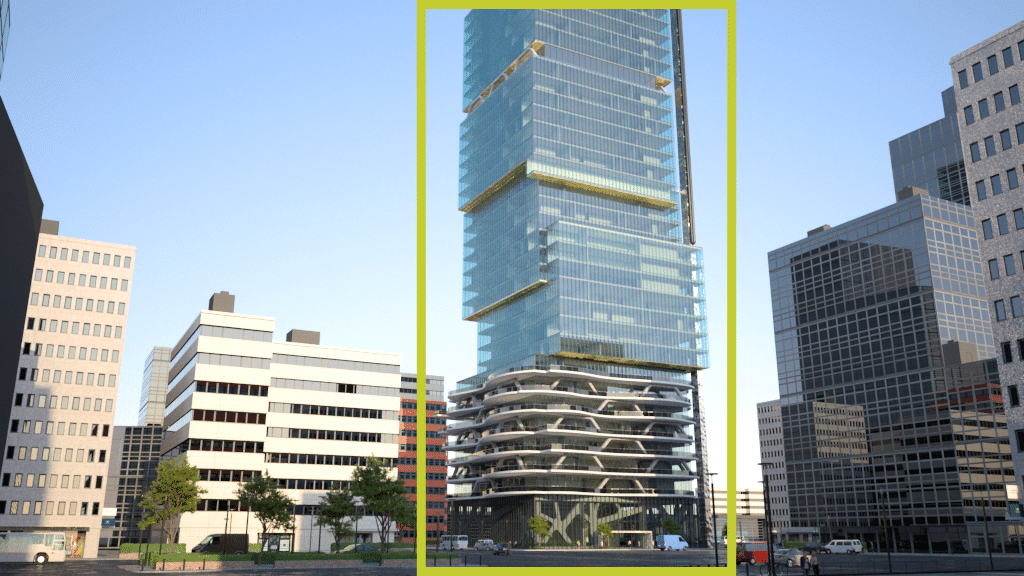
In this example, we will take a building in an urban environment. Let’s say, the main object of interest is the building itself, and the goal is to determine what material is the most suitable for the client.

Figure 3 – Example scene. Object of interested circled in yellow

Figure 4 – Illustration of the binary masks used in example scene. Left: mask for building. Right: mask for environment.

Figure 5 – Rendering of the scene. Left: using building mask. Middle: using environment mask. Bottom: combination of both.

Table 1 – Relative time gain to process the rendering of environment only and building only compared to the rendering of the whole scene (classic rendering)
In this example scene, the materials used in the environment area and the ones used in the building area may differ and sometimes have important differences in their complexity. The time to render multiple glass materials will not be the same than rendering a texture on the grass.
Also, we need to consider the loading of the scene which is identical whatever the size of the binary mask selected. It can be represented as a debt that will be resorbed with the time gain by the mask rendering when computing multiple rendering of the building only, such as represented in Figure 6.

Figure 6 – Representation of the cumulated time taken to render the scenes after multiple renderings. In example scene, gain starts at render #3
- The area taken by the OOI in the final render
- The material types used in the OOI
- The Ocean scene loading time


Figure 7 – The smaller the area to be re-rendered, the better the time performance will be when rendering the material(s) of interest multiple times. Gain will be highest in top left image and lowest in bottom image.
Conclusion
In this article, we illustrated the mask rendering on a simple case. Virtual prototyping needs a lot of iterations when testing material types and, thus, takes a lot of time in a project pipeline. Even though not all scenes could benefit from this technique, it could save time further down the road in the project pipeline.
Responses